Create Attribute
Modified on Thu, 28 Jul 2022
What are Attributes?
Attributes are used to define the content of a business object. Each Attribute has a name, type, cardinality, and other optional properties.
If you can relate BO to a table, Attributes are the columns.
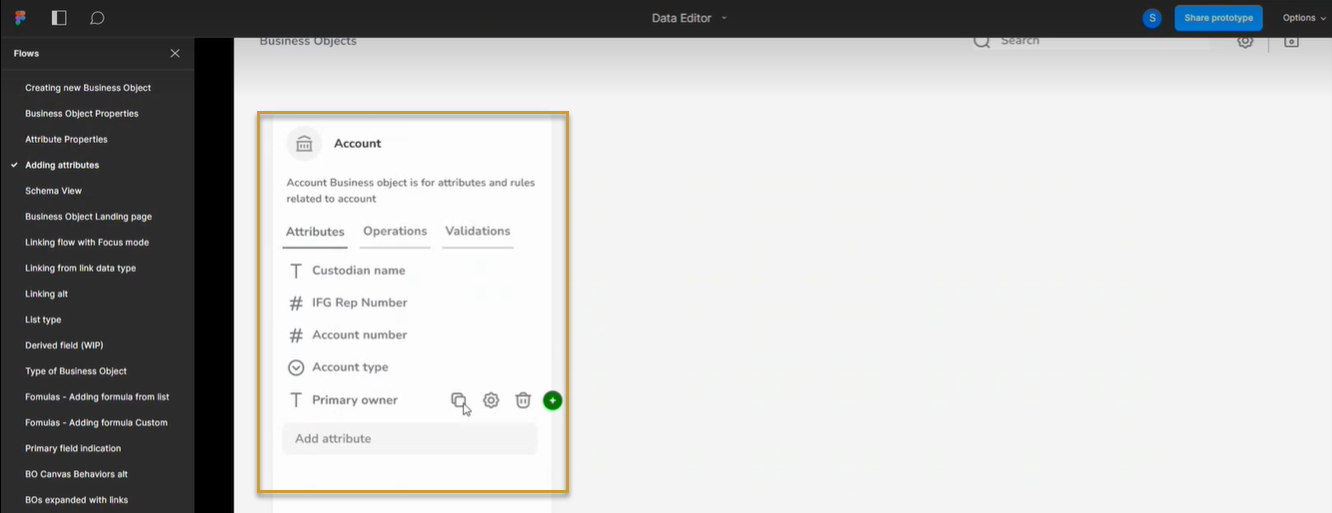
After you create a business object, you can use the Data editor to create or change its attributes.
Create Attributes
Type the name of the Attribute.
Define the Data Type of the Attribute.
Press Enter key and continue adding the next attribute.
You can use the icons near each attribute to edit, duplicate, change settings, delete, and link the attribute to other BOs.
Depending upon the data type of the attribute, a data type icon is assigned to the attribute.
Was this article helpful?
That’s Great!
Thank you for your feedback
Sorry! We couldn't be helpful
Thank you for your feedback
Feedback sent
We appreciate your effort and will try to fix the article